Parallel 3D RM-synthesis and RM-CLEAN with Dask
The rm_lite.tools_3d tools build lazy dask.array graphs: rmsynth_3d and rmclean_3d map their per-spectrum math over spatial chunks with dask.array.map_blocks/dask.delayed, one task per chunk. Nothing runs until you call .compute() (or write to zarr). That means the same code runs serially, across threads/processes on one machine, or across a dask.distributed cluster on many nodes; only the scheduler changes.
This notebook shows how to pick that scheduler, and the one built-in config that matters for it: nufft_nthreads.
A stage’s inner work is either compiled C or a per-pixel Python loop, and the two want opposite schedulers; a full run mixes both:
Stage |
Inner work |
Releases the GIL? |
Best scheduler |
|---|---|---|---|
RM-synth / RMSF ( |
|
yes |
threads |
Stokes I fit ( |
per-pixel |
no |
processes |
RM-CLEAN ( |
per-pixel Hogbom loop (Python) |
no |
processes |
All stages together (synth + fit + CLEAN) |
mix of C and Python |
partly |
distributed (processes, a few threads each) |
The distinction is the Python GIL:
Threads share one process and its memory, so there is no data copying and startup is instant. But the GIL lets only one thread run Python at a time, so threads only speed up work that releases the GIL. The NUFFT does (it is compiled C), so RM-synth scales on threads.
Processes each run a separate Python interpreter, so they run pure-Python code truly in parallel, at the cost of copying inputs/outputs between them and slower startup. The per-pixel Stokes I fit and the RM-CLEAN minor loop are pure Python (they hold the GIL), so they only scale on processes.
Rule of thumb: C/NUFFT work wants threads, per-pixel Python loops want processes. The rest of this notebook shows each in turn.
Where to run it: picking a cluster
The stage above decides threads vs processes; where you run decides the cluster. It is the same lazy graph either way, so start simple and scale up:
Where you are running |
Cluster / launcher |
Notes |
|---|---|---|
One machine, quick run |
none: just |
simplest, no |
One machine, want a dashboard + memory management |
|
|
HPC batch scheduler |
|
one job per node, |
A few machines over SSH |
|
no batch system needed |
Kubernetes / cloud |
|
beyond this notebook |
Whichever cluster you pick, a Client makes it the default scheduler, so the rm-lite calls do not change. The per-stage threads/processes choice and the thread counts in the final summary stay the same.
[1]:
from __future__ import annotations

import time

import dask
import dask.array as da
import matplotlib.pyplot as plt
import numpy as np
from dask.diagnostics import ProgressBar
from rm_lite.utils.synthesis import faraday_simple_spectrum

plt.rcParams["figure.dpi"] = 150
rng = np.random.default_rng(42)
A small chunked cube
Simulate a compact Stokes Q/U cube with a per-pixel RM, then wrap it in a dask.array chunked spatially only (the frequency axis is always kept whole, since RM-synthesis needs every channel per pixel). A real cube would come from read_fits_cube_dask or dask.array.from_zarr; here we build one in memory so the notebook is self-contained.
The single most important tuning rule: make more chunks than you have workers, so every worker stays busy. We use small chunks here to get many blocks out of a tiny demo cube.
[2]:
n_freq, ny, nx = 48, 96, 96
freq_hz = np.linspace(800e6, 1088e6, n_freq)

y_grid, x_grid = np.mgrid[0:ny, 0:nx]
rm_map = 60.0 * (x_grid / nx - 0.5) * 2
frac_pol = 0.6

stokes_q = np.empty((n_freq, ny, nx), dtype=np.float64)
stokes_u = np.empty((n_freq, ny, nx), dtype=np.float64)
for j in range(ny):
    for i in range(nx):
        spec = faraday_simple_spectrum(
            freq_hz, frac_pol=frac_pol, psi0_deg=30.0, rm_radm2=rm_map[j, i]
        )
        stokes_q[:, j, i] = spec.real + rng.normal(0, 0.02, n_freq)
        stokes_u[:, j, i] = spec.imag + rng.normal(0, 0.02, n_freq)

# freq axis whole (-1), 16x16 spatial chunks -> 6x6 = 36 blocks
q_dask = da.from_array(stokes_q, chunks=(-1, 16, 16))
u_dask = da.from_array(stokes_u, chunks=(-1, 16, 16))
print(f"chunks: freq={q_dask.chunks[0]}, spatial blocks={q_dask.numblocks}")
assert len(q_dask.chunks[0]) == 1  # freq axis must be a single chunk
chunks: freq=(48,), spatial blocks=(1, 6, 6)
The built-in config: nufft_nthreads
finufft is itself OpenMP-threaded and by default grabs all cores for a single transform. When Dask already runs many chunks in parallel, that nests two layers of threading and oversubscribes the cores, which is slower than either layer alone.
So rmsynth_3d defaults to ``nufft_nthreads=1``: one thread per NUFFT call, and let the Dask scheduler parallelise across chunks instead. This is the fast config whenever you have many chunks (the usual case). It is a performance knob only; it does not change the result. The cell below asserts exactly that.
[3]:
from rm_lite.tools_3d.rmsynth import rmsynth_3d

synth_kw = {"phi_max_radm2": 120.0, "d_phi_radm2": 8.0}

# default: one finufft thread per chunk, dask parallelises across chunks
res = rmsynth_3d(q_dask, u_dask, freq_hz, **synth_kw)
# nufft_nthreads=0 hands each call back to finufft's own OpenMP (all cores)
res_omp = rmsynth_3d(q_dask, u_dask, freq_hz, nufft_nthreads=0, **synth_kw)

# ProgressBar (from dask.diagnostics) shows a live bar for any local-scheduler
# compute (synchronous/threads/processes).
with ProgressBar():
    fdf_default = res.fdf_dirty_cube.compute()
    fdf_omp = res_omp.fdf_dirty_cube.compute()
np.testing.assert_allclose(fdf_default, fdf_omp, atol=1e-10)
print("nufft_nthreads changes speed, not the result: OK")
[########################################] | 100% Completed | 205.72 ms
[########################################] | 100% Completed | 202.32 ms
nufft_nthreads changes speed, not the result: OK
Choosing a scheduler
The lazy cube computes under whatever scheduler you ask for. For the NUFFT stage the threaded scheduler is the right default (the NUFFT releases the GIL). Pass it explicitly with scheduler= on .compute(), or set it globally with dask.config.set.
The result is identical across schedulers; only the wall-clock differs. We assert the invariance and print the timings (timings are machine-dependent, so they are not asserted).
[4]:
def timed(label, arr, **kw):
    t = time.time()
    with ProgressBar():
        out = arr.compute(**kw)
    print(f"{label:24s} {time.time() - t:6.3f}s")
    return out


serial = timed("synchronous", res.fdf_dirty_cube, scheduler="synchronous")
threaded = timed("threads", res.fdf_dirty_cube, scheduler="threads")
np.testing.assert_allclose(serial, threaded, atol=1e-10)
print("same result under both schedulers: OK")
[########################################] | 100% Completed | 204.57 ms
synchronous               0.212s
[########################################] | 100% Completed | 205.32 ms
threads                   0.212s
same result under both schedulers: OK
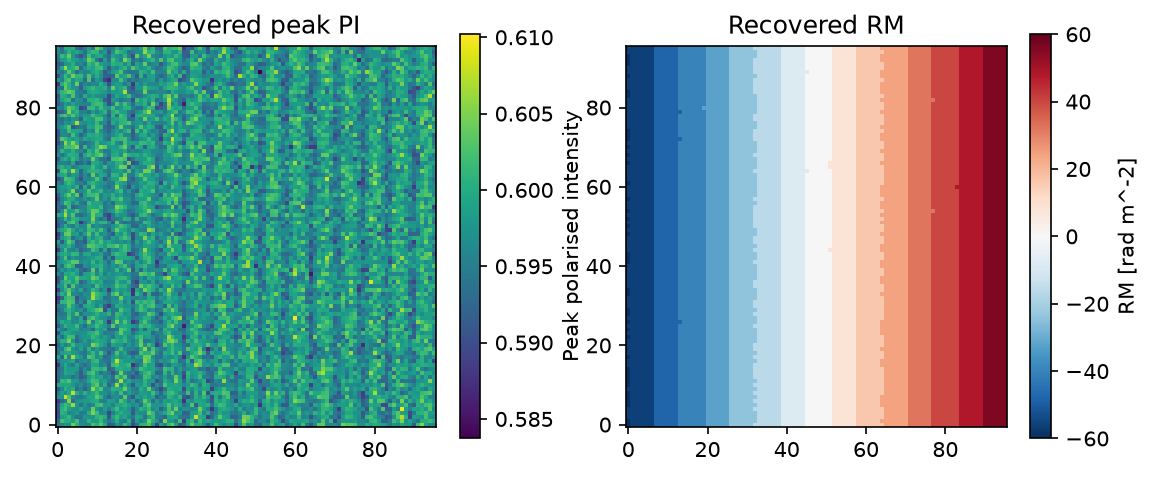
[5]:
peak_pi = np.max(np.abs(threaded), axis=0)
peak_rm = res.phi_arr_radm2[np.argmax(np.abs(threaded), axis=0)]

fig, (ax1, ax2) = plt.subplots(1, 2, figsize=(9, 3.5))
im1 = ax1.imshow(peak_pi, origin="lower")
fig.colorbar(im1, ax=ax1, label="Peak polarised intensity")
ax1.set(title="Recovered peak PI")
im2 = ax2.imshow(peak_rm, origin="lower", cmap="RdBu_r", vmin=-60, vmax=60)
fig.colorbar(im2, ax=ax2, label="RM [rad m^-2]")
ax2.set(title="Recovered RM")
# the recovered RM gradient should track the input gradient in x
assert peak_rm[:, -1].mean() > peak_rm[:, 0].mean()
The GIL-bound stages: use processes
RM-CLEAN (rmclean_3d) and the optional per-pixel Stokes I fit are pure-Python per-pixel loops. The threaded scheduler cannot overlap them (the GIL lets only one thread run Python at a time), so here we compute with scheduler="processes". Contrast the RM-synth cells above, which used threads because the NUFFT is C: same lazy cubes, opposite scheduler, and the choice is driven entirely by whether the inner work is C or Python.
For these stages nufft_nthreads is irrelevant (no NUFFT in the CLEAN loop), and the tuning flips from one process, many threads to many processes, one thread each. For anything beyond one machine, use a dask.distributed cluster instead (next section) for the dashboard, memory management, and multi-node reach.
[6]:
from rm_lite.tools_3d.rmclean import rmclean_3d_from_synth

# The processes scheduler spawns workers. Use the 'fork' start method so it
# runs in a plain script/notebook without an `if __name__ == '__main__'`
# guard (the default on Linux; set explicitly here for macOS too).
dask.config.set({"multiprocessing.context": "fork"})

# CLEAN needs the dirty FDF + RMSF cubes; keep them chunked spatially.
clean = rmclean_3d_from_synth(res, auto_mask=6, auto_threshold=1, max_iter=200)
# lazy, like the synth results; compute across processes (GIL-bound loop).
# num_workers=4 keeps this tiny demo light; use n_cores in practice.
with ProgressBar():
    clean_fdf = clean.clean_fdf_cube.compute(scheduler="processes", num_workers=4)
print(f"clean FDF cube: {clean_fdf.shape}, {clean_fdf.dtype}")
assert clean_fdf.shape == threaded.shape
INFO rmclean.rmclean_3d_from_synth: Theoretical FDF noise: 0.144. Auto mask: 0.866, auto threshold: 0.144.
[########################################] | 100% Completed | 1.74 s
clean FDF cube: (31, 96, 96), complex128
Dask distributed (single node and multi-node)
A dask.distributed Client becomes the default scheduler for every subsequent .compute(), so no rm-lite code changes. Its workers are processes, each with a thread pool, which serves both stage classes at once: the NUFFT parallelises over each worker’s threads, while the GIL-bound fit and CLEAN parallelise over the worker processes.
distributed is a dev/docs extra of rm-lite (pip install distributed), so it is available whenever these docs run. The runnable cell below uses in-process threaded workers (processes=False) so it executes inside the docs build. A real deployment uses process workers, as in the LocalCluster/SLURMCluster snippets below.
Progress with a Client works differently from ProgressBar (see dask/distributed#926): submit the graph as a future with client.compute(...) (it runs in the background), then call progress(future) to draw the bar and wait(future) to block until it finishes. The live dashboard at client.dashboard_link is the richer view.
# Single fat node: processes for the GIL-bound stages, a few threads each
# for the NUFFT. Pin OMP so finufft does not re-oversubscribe.
import os
os.environ["OMP_NUM_THREADS"] = "1"
from dask.distributed import Client, LocalCluster
cluster = LocalCluster(n_workers=6, threads_per_worker=2)
client = Client(cluster)

# Many nodes via a batch scheduler (SLURM shown; PBS/LSF analogous):
from dask_jobqueue import SLURMCluster
cluster = SLURMCluster(
    cores=12, processes=6, memory="64GB",
    job_extra_directives=["--export=OMP_NUM_THREADS=1"],
)
cluster.scale(jobs=10)      # 10 nodes
client = Client(cluster)
For multi-node runs the input cube must be reachable from every worker: put it on a shared filesystem, or (better) store it as zarr and read with da.from_zarr, so each worker reads only its own chunks. Write outputs the same way with write_zarr_group.
[7]:
from dask.distributed import Client, LocalCluster, progress

with (
    LocalCluster(
        n_workers=1, threads_per_worker=4, processes=True, dashboard_address=None
    ) as cluster,
    Client(cluster) as client,
):
    future = client.compute(clean.clean_fdf_cube)
    progress(future, notebook=False)
    clean_dist = future.result()

np.testing.assert_allclose(clean_dist, clean_fdf, atol=1e-8)
print("\ndistributed Client: same CLEAN result, OK")
[########################################] | 100% Completed |  4.7s
distributed Client: same CLEAN result, OK
Summary: what to run
Two settings are always the same, so set them once and forget them:
``nufft_nthreads=1`` (the default, an argument to
rmsynth_3d) and ``OMP_NUM_THREADS=1`` (an environment variable, set before rm-lite or finufft is imported, on every worker). Both say the same thing: let Dask do the parallelism, not finufft’s internal OpenMP. Leaving finufft’s OpenMP on is the main way to make this slower, by oversubscribing the cores. The one time to changenufft_nthreadsis when Dask is not spreading chunks across the cores: thesynchronousscheduler, or a cube with fewer chunks than cores. Then setnufft_nthreads=0so finufft’s OpenMP fills the otherwise-idle cores. The invariant isnufft_nthreads x dask_workers≈ n_cores: the default is the1 x n_coressplit,nufft_nthreads=0is the oppositen_cores x 1extreme, only sensible at about one chunk. Never runnufft_nthreads > 1and many workers.More chunks than workers. Pick
target_chunk_mb(on the FITS reader) so there are several chunks per worker; that balances load and caps per-task memory.
The only real choice is the scheduler and its thread/worker counts, and it follows from what you are running. Counts below are for one 12-core node; scale by your core count, and keep total threads across all workers equal to the cores (Dask threads x processes = cores, with OMP_NUM_THREADS=1):
What you are computing |
Scheduler / cluster |
Threads to set, and where |
Why |
|---|---|---|---|
RM-synth only ( |
threaded |
|
the NUFFT releases the GIL, so threads parallelise it |
RM-CLEAN, or RM-synth with the Stokes I fit |
processes |
|
per-pixel Python loops are GIL-bound; only processes overlap them |
All stages in one run (synth + fit + CLEAN) |
|
|
one |
A cube too big for one machine, or many nodes |
|
|
the same split, scaled across nodes |
For a mixed synth-then-CLEAN pipeline, do not switch schedulers between stages: use one distributed Client of several processes, a few threads each (the 6 x 2 = 12 layout above). Processes cover the GIL-bound CLEAN, threads cover the NUFFT, and the cheap NUFFT stage loses less to the process layout than CLEAN would lose to a threads-only one. On a batch scheduler the same split is SLURMCluster(cores=12, processes=6, ...) (6 workers x 2 threads per job), with OMP_NUM_THREADS=1
exported to the job.